Build a custom feed
On this page
A Custom feed sends only what you switch on. That can be any attribute a Google feed has, plus fields of your own under any name. Use it for any destination that reads a feed file, from a Google Ads page feed to a partner's product list. The app rebuilds it as your catalog changes, so the file is always current.
Create the feed
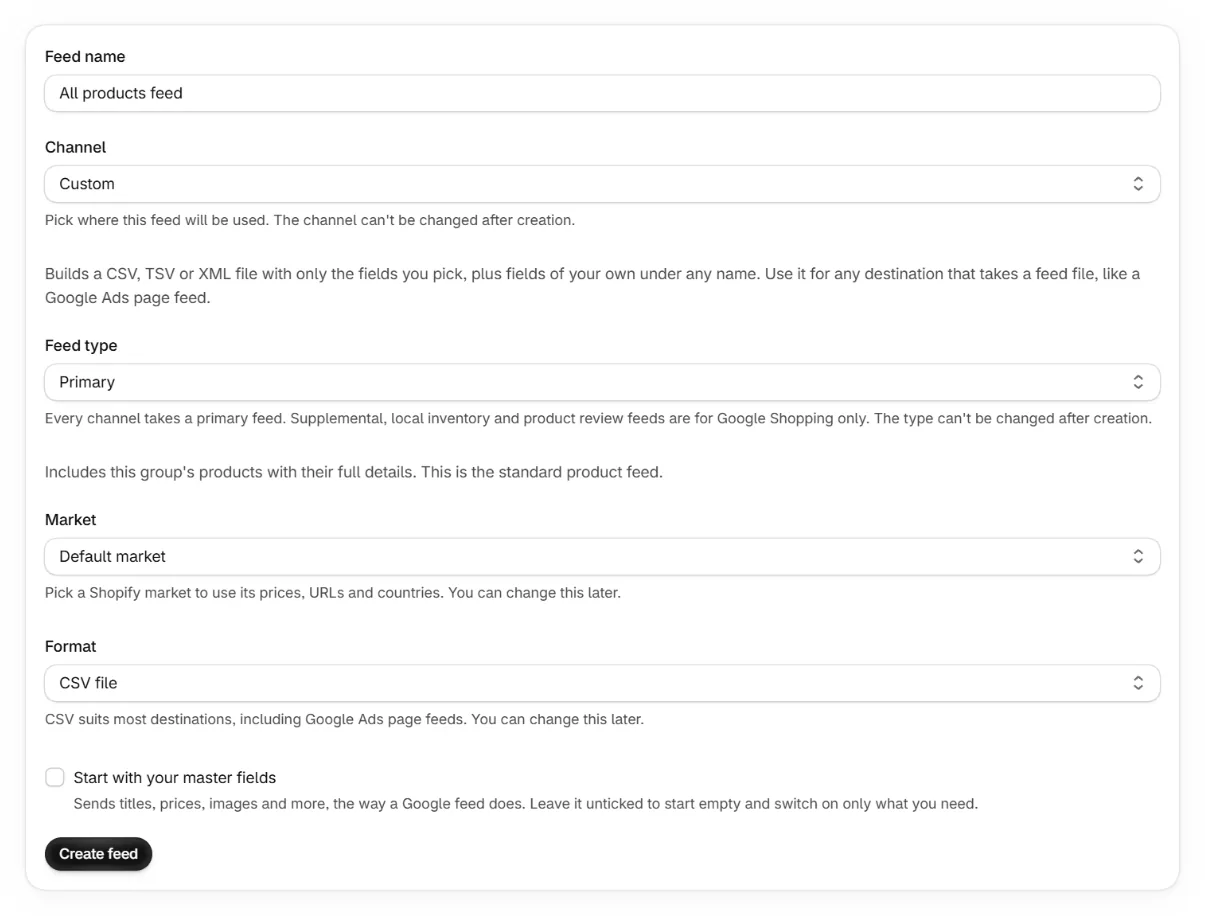
Add a feed and pick Custom as the channel.
Pick CSV, TSV or XML. CSV suits most destinations. Custom feeds are available on paid plans.
Leave Start with your master fields unticked to start empty.
Unticked, the feed sends nothing until you switch something on. Ticked, it sends what a Google feed does, from your master fields.
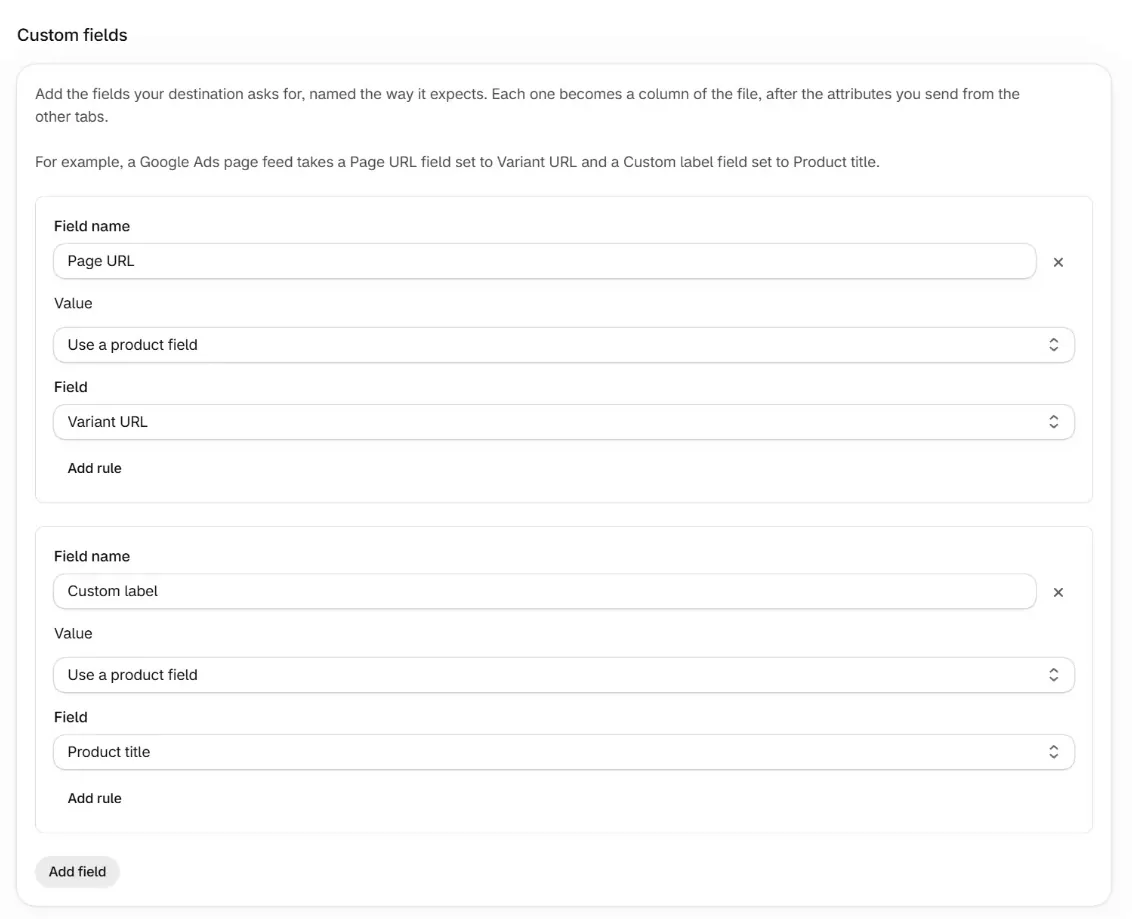
Add your fields on the Custom fields tab.
Press Add field, type the name the destination expects, and pick a value from the list. Then save.
Give the feed URL to the destination.
Copy it from the feed's page. Each fetch gets the current file.
Field values
A field takes the same choices as any attribute. Use a product field reads a value from your catalog. Set a fixed value sends the same text on every row. You can also combine fields, replace values with a table or take part of a field, and Add rule sends a different value to the products you pick. These product fields cover most files.
- Variant URL is the variant's own page, with its ?variant= link.
- Product URL is the plain product page.
- Product title is the product's title, and Variant title holds the option values, like Large / Green. A product without variants has an empty variant title.
- Product type and the other product fields come straight from Shopify.
For anything else, Custom expression takes a Liquid expression, where item is the row the feed has built so far, like {{ item.price }} for the price with its currency.
Attributes
Every tab of a Google feed's editor is here too. Pick a value for an attribute and it becomes a column of the file under its Google name, like title or link. Exclude takes it out again. A field of your own named like an attribute the feed sends fills that attribute's column instead of adding one.
One row per variant
The file has a row for every variant. To send each product once, pick First variant only under Variants to include on the Metadata tab. A product with no image or no price still gets its rows, since a Custom feed requires nothing.
Google Ads page feeds
A page feed tells Google Ads which pages of your store its Dynamic Search Ads and Performance Max campaigns can use. It takes a Page URL column, one URL per row, and an optional Custom label column you can target in campaigns.
Add two fields.
Name the first Page URL and pick Variant URL. Name the second Custom label and pick Product title. Then save.
Add the feed URL in Google Ads.
Add a page feed under Business data and set it to fetch the feed URL on a schedule, so the page feed stays current as your catalog changes.
Page URL,Custom label
https://example.com/products/green-tea?variant=4321,Green Tea Tin
https://example.com/products/green-tea?variant=4322,Green Tea TinA label cell can hold up to 20 labels separated by semicolons. To label each row with its title and its product type, set Custom label to Combine fields, pick Product title and Product type, and type a semicolon as the Separator.
Frequently asked questions
Can I name the fields anything?
Yes. Each field is written under the name you type, up to 100 characters, in the order you add them. In an XML file a name becomes a tag, so there it starts with a letter and uses only letters, numbers, underscores, hyphens and dots.
Which file formats can a Custom feed use?
CSV, TSV or XML. CSV suits most destinations, including Google Ads page feeds.
Why does a field show the plain Shopify title?
Product fields read your catalog as it is in Shopify. To send the title your master fields build, pick the title master field in the field's list instead.
Do product overrides change a Custom feed?
Yes, as on any feed. An override from the Products page changes the attribute it names. Your own fields keep their values.
Keep reading
Was this page helpful?