Master fields
On this page
Master fields are the rules every feed shares, so a store with a primary feed, a supplemental feed and a feed per market keeps one title rule instead of three. You set them on the Master fields tab under Settings, and every feed follows them unless it sets its own rule.
Your smart defaults are master fields
Every store starts with a master field for each attribute the app fills in for you, such as title, description, images, availability, price, sale price, item group ID, brand, GTIN, identifier exists, color and cost of goods sold. Each one holds the smart default until you change it, so you can see and edit what every feed sends from one place. Reset puts the smart default back. Expiration date and the destinations send nothing for most stores, so you add them as master fields only when you need them.
Two kinds of master field
- A field named after a Google attribute, such as title or brand. Every feed sends that attribute from this rule unless the feed sets its own rule for it.
- A Helper field with any other name, such as clean_title. Feeds read it as master.clean_title in any attribute rule or custom expression. It is never sent on its own.
Both kinds take the same rule editor as a feed attribute. Conditions, fixed values, combined fields, replacement tables, parts of a field and custom expressions all work. A field can read any other master field, so a helper can feed a default. The one limit is a loop, where a field ends up reading itself.
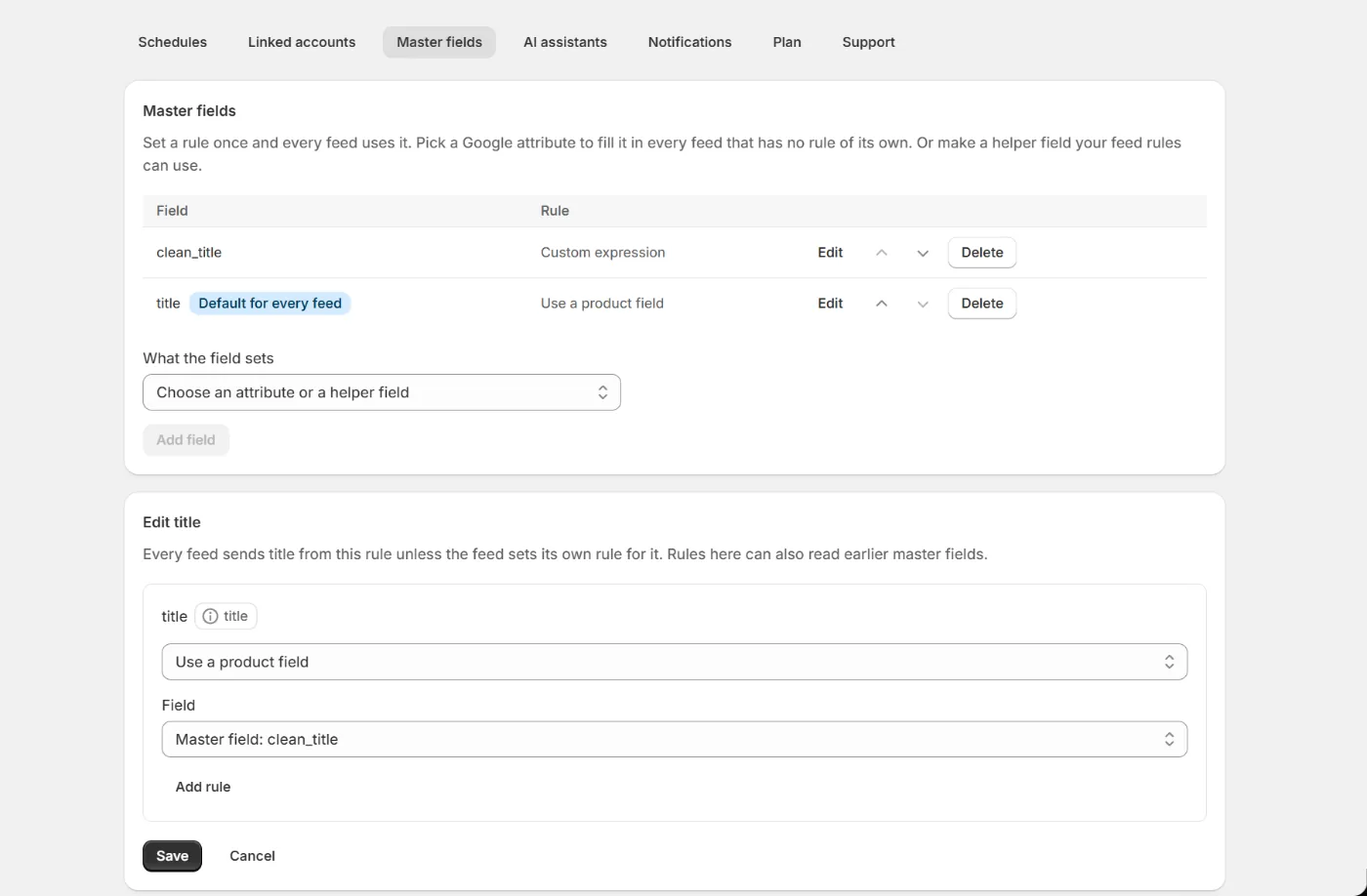
Change or add one
Press Edit beside a field to change its rule, or Edit master field under the attribute in any feed. Both open the same editor. To add another field, such as a custom label every feed should share, or a helper field, follow these steps.
Open Settings and pick the Master fields tab.
Choose the Google attribute the field sets, or pick A helper field with its own name and type a name. Then press Add field. Helper names use lowercase letters, numbers and underscores.
Build the rule.
The editor is the one from the feed attribute tabs. Save when the rule is right.
Every feed rebuilds.
Feeds that inherit the field pick it up on the next run.
How a feed uses it
In the feed editor, an attribute that follows a master field shows Use a product field with the master field picked, and the rule it holds. The rule is changed in Settings only, so it has one home, and Edit master field takes you there. To give one feed its own rule, pick any other value or field in that feed. That rule wins in that feed only, the smart default included, so a feed can send Google's normal value instead of the master field. Picking the master field again, or Use the master field, hands the attribute back.
New feeds start with your master fields. Untick Start with your master fields when you add a feed, or later on its Setup tab, and it sends item ids and plain Shopify values for title, description, link, image, availability and price, and nothing else until you set it. A custom feed starts unticked and sends nothing at all until you switch something on. A rule that reads a master field by name still works there.
Helper fields appear in the field picker under their master name. A title rule can combine master.clean_title with the color, and a description expression can print it with the usual double braces.
{{ master.clean_title }} by {{ product.vendor }}. {{ product.description }}Note. A field named after an attribute has Reset instead of Delete, which puts the smart default back for every feed that follows it. A helper field cannot be deleted while a feed rule or another master field reads it by name. The refusal names what still reads it, so you can move those rules first.
Share a feed's rules when you add a feed
Adding a feed while another feed has rules of its own? The new feed form offers to share them with every feed. Tick the box and those rules become master fields, so the new feed starts with them. The first feed keeps sending the same values.
History
Every change to master fields is saved as a version, rules shared from a feed included. The History section on the Master fields tab lists them with the fields each one changed. Press Restore on a version to apply it to every feed. A restore is refused while a feed rule still reads a field the version would remove.
To undo a share, restore the version from before it in History, then restore the first feed's previous version from that feed's own history. Restore in that order, or the feed's rules match the shared ones and nothing changes.
Note. Every plan uses master fields, the free plan included. Changing them needs a paid plan. If you move to the free plan, every feed keeps using the master fields you made. Restoring an older version of a feed restores that feed's own rules and leaves master fields as they are.
Frequently asked questions
Does a master field overwrite a rule I already set in a feed?
No. A feed's own rule always wins in that feed. The master field applies to every feed that has not set its own rule for the attribute.
Why can't I change a master field from the feed editor?
So every rule has one home. A feed shows the master field it follows and links to it, and a change made in Settings reaches every feed at once. To change one feed only, pick another value in that feed.
Can I rename a master field?
Not yet. Create a field with the new name, move the rule across, update any feed rules that read the old name, then delete the old field.
Can my AI assistant see master fields?
Yes. The mapping schema it reads lists every master field, and a feed's rules show which attributes take the store default. A rule an assistant writes applies to one feed only. Creating and editing master fields happens in the app for now.
Keep reading
Was this page helpful?