What connected AI assistants can do
On this page
Once connected, your AI assistant works with the same data and rules as the app itself. You ask in plain language. The assistant reads your real feed data, proposes changes, and applies only what you approve.
What it can read
- Every feed's settings, status and last run result.
- Products in a feed, with their per feed switches and overrides.
- The exact preview output for any product. What it sees is what the channel gets.
- Merchant Center issues across your whole account, grouped worst first.
- Search Console queries for your product pages once search data is synced.
- The optimization playbooks for every feed attribute, from titles and prices to shipping and custom labels.
What it can change
- Feed settings across every editor tab.
- Per product attribute overrides and include or exclude switches.
- Feed regeneration. It can queue a fresh run after changes.
Note. Every change follows a preview then confirm flow. The assistant must show you the proposed change and get your go ahead before anything is applied.
The guided optimization loop
Ask the assistant to optimize your feed and it works through the same sections as the Optimization page. Counts on the page drop as it works.
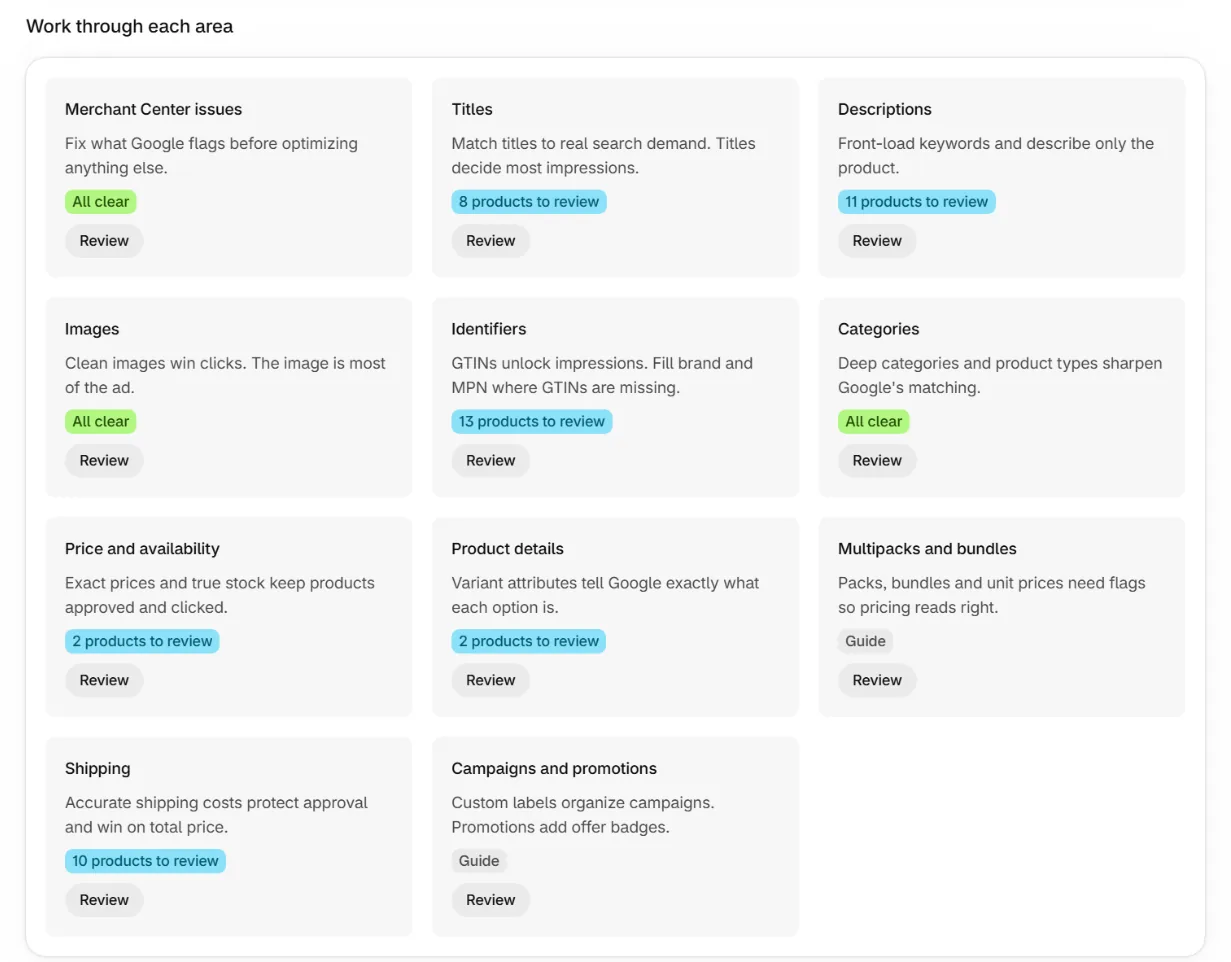
The assistant does not work from generic advice about writing good copy. Every section carries a playbook written by Digital Darts, a Google Partner agency with over 10 years growing Shopify stores through Google Ads. Your assistant gets the same rules that agency uses on client accounts.
Picks the worst problem first
Rejected products come first, because a rejected product earns nothing. After that the assistant works down by lost impressions. You never have to work out the order yourself.
Loads the rules for that section
Each section has its own rules, and the assistant reads them before writing anything. They cover where the important words go in a title, what Google cuts off, and which fields it matches searches against.
Drafts a change from your data
Every change is built from your live product fields, your Merchant Center issues and the search queries your products already appear for. A new title uses the words real shoppers typed.
Waits for your approval, then verifies
Nothing changes until you approve it. The assistant then opens the feed preview and shows you the result, so you see what Google will receive before Google does.
The same playbooks are on the Optimization page in the app, section by section. Reading them yourself and working by hand gets the identical result. The assistant is the fast way through, not a different set of rules.
There are two ways through a section, and a good assistant picks between them based on the size of your catalog.
Product by product
The assistant fetches the next affected product, reads its live issues and search queries, proposes one change, applies it after your approval, then verifies the result in the preview and moves on. That suits a small catalog and the leftovers after a bigger fix.
Field by field
The assistant reads a page of the products a section flags and looks for what they have in common. Where the fix is a rule, one change to the feed setting fixes the whole field at once. Missing product types filled from your tags is one rule, not thousands of decisions.
Bulk edits where no rule fits
Some fixes are per product by nature and still run in bulk. Titles are the clearest case. Search Console gives each product its own top query and its own missing words, so every product needs a different title and no feed setting can produce that. The assistant reads the search data for a page of products, writes a title for each, shows you the list, and applies up to 200 in one approved step.
By default those overrides apply to every feed at once, so a title pass is done once and every feed gets it. A feed can still carry its own value for a product, and that value wins in that feed only. If your feeds serve more than one language, the assistant writes titles and descriptions per feed.
The tools by name
Assistants list these tools after connecting. If your connector shows a different set, reconnect with a fresh code.
list_feeds              Every feed with status and last run
get_feed                One feed's full settings
list_products           Products in a feed with switches and overrides
preview_product         The exact feed output for one product
list_product_issues     Merchant Center issues, grouped worst first
get_search_queries      Search Console queries for a product page
get_optimization_guide  The optimization playbook per section
list_section_products   Products a section flags, in pages of 50
get_mapping_schema      The rules for building a field across the catalog
update_feed_settings    Change feed settings, after your approval
set_product_override    Override one product's attributes, after approval
set_product_overrides   Override many products at once, after approval
set_products_included   Include or exclude products, after approval
run_feed                Queue a fresh feed run
optimize_next Fetch the next product in the optimization loopHow to ask
Clients that support MCP prompts, like Claude, also get an optimize prompt in their prompt menu. It starts the same guided loop. The identical prompt is copyable from the app's AI assistants settings page, so clients without prompt support can paste it instead.
The wording matters more than most merchants expect. A prompt that names the section, the data to use and how much to change at once gets a far better pass than a one line request. There are prompts to copy and rules for writing your own.
Limits that always apply
- Plan rules bind the assistant exactly as they bind the app.
- The item id can never be changed. It is how Google identifies each item.
- Assistants never see your Google tokens or other stores' data.
- Revoking the connection in settings stops access immediately.
Frequently asked questions
Can an assistant change my Shopify products?
No. It reads your catalog through the app and writes only to your feed settings and your per product overrides. Your products, customers and orders are never touched.
Do I have to approve every change?
Yes. Every write shows you the proposed change first and applies nothing until you confirm it.
Which assistants can connect?
Claude, ChatGPT, Cursor and any other client that supports remote MCP servers with OAuth. The connection guide has the steps for each one.
Is this included on the free plan?
No. AI assistant connections are included on every paid plan.
Does the assistant need my Search Console data?
No, every part of the loop works without it. It matters most for titles, because your queries are what tell the app which titles are missing real search demand. The assistant also uses those queries on descriptions, where the words shoppers search with belong in the first 160 characters.
Keep reading
Was this page helpful?