How to Build a Google Ads Page Feed From Your Shopify Store
On this page
- What is a Google Ads page feed?
- What columns does a page feed need?
- Should a page feed list product URLs or variant URLs?
- What should the custom labels in a page feed say?
- Why does Google disapprove page feed URLs from a Shopify store?
- How do you build the page feed from your Shopify catalog?
- How do you add a page feed to Google Ads?
- What happens to page feeds when Dynamic Search Ads become AI Max?
- Google Ads page feed FAQ
Shopify has no page feed of its own, so we built one into FeedShine. To build a Google Ads page feed from Shopify, write product or variant URLs on your primary domain into a Page URL column, label them in a Custom label column, and add the file as a page feed under Business data in Google Ads.
This page covers which URLs belong in the file, what the labels should say so campaigns can still target pages after Dynamic Search Ads become AI Max, and how to keep the file current without exporting it again.
What is a Google Ads page feed?
A Google Ads page feed is a spreadsheet of your website's URLs, one per row with optional custom labels, that tells Dynamic Search Ads, Performance Max and AI Max for Search campaigns which pages they may use as landing pages.
Google's help page for Performance Max says a page feed helps Google Ads "check that all relevant pages are indexed, determine when to show your ads, and where to direct people on your website". AI Max for Search is the set of automated Search campaign features that Google calls the next generation of Dynamic Search Ads.
A Shopify store that runs Shopping ads and campaigns that read a page feed works from two feeds built on one catalog. The product feed goes to Merchant Center and drives the Shopping ads. The page feed goes to Google Ads and points text ads at your pages, which is why a page feed needs only a URL and its labels.
What columns does a page feed need?
A page feed has two columns, Page URL with one URL per row and Custom label with up to 20 labels for each URL, separated by semicolons.
A custom label is a free-text tag that lets a campaign treat a set of URLs as one group. Google's template carries both headers and asks for at least two columns, so keep the Custom label header even when some rows have no labels.
Page URL,Custom label
https://example.com/products/merino-crew,Sweaters;Merino Wool
https://example.com/products/trail-runner,Shoes;Running
https://example.com/products/green-tea,"Tea;Green Tea, Loose Leaf"In a CSV file, a label that contains a comma needs double quotes around the whole cell, as the green tea row shows. Without the quotes, the comma splits the row into an extra column.
For the URLs themselves, Google asks for the final URL rather than one that redirects, no tracking parameters, and pages its AdsBot crawler can open. Tracking parameters already in a feed "won't impact serving and may be removed periodically", in Google's words.
Should a page feed list product URLs or variant URLs?
Use variant URLs when a campaign should land shoppers on a specific size or color, and product URLs when you want a smaller file with one row per product.
A Shopify variant URL is the product URL with the variant's ID added as a query string. The variant URL opens the same product page with that size or color already selected, and its row can carry labels for the variant's own option values, such as Large or Green, for an ad group to target.
A product URL opens the page on its default variant and gives each product a single row. The file stays shorter, and Google has fewer pages to crawl before the feed can serve.
https://example.com/products/merino-crew?variant=43210
https://example.com/products/merino-crew?variant=43211
https://example.com/products/merino-crewWhichever you choose, give every row its own URL. A file that writes the plain product URL on every variant row repeats that URL once per variant, and Google treats repeated URLs as duplicates.
In FeedShine, product or variant rows come down to one setting, Variants to include on a feed's Metadata tab. Every variant as its own item writes a row for each variant, and First variant only writes one row per product. A field set to Variant URL writes each row's own ?variant= link. A field set to Product URL writes the plain product URL, so it belongs with First variant only.
What should the custom labels in a page feed say?
Each URL's custom labels should name the groups you will want to target, bid on or exclude, such as product type, brand or season, because custom labels are how Google Ads campaigns pick groups of pages out of a page feed.
In Dynamic Search Ads, a custom label "will help you target ads within your page feed and adjust your bid per label", according to Google. Performance Max uses labels to give an asset group its feed URLs and to exclude URLs, and AI Max uses them as ad-group URL inclusions.
Four Shopify fields make ready-made labels. Product type and vendor give you category and brand labels, variant option values give you size and color labels, and tags can carry anything else, such as a season or a promotion.
In a FeedShine Custom feed, set the label field to Combine fields, pick Product type and Product vendor, and type a semicolon as the Separator. Every row then carries two labels, its category and its brand.
Page feed labels are separate from the five custom label attributes in a Merchant Center product feed, custom_label_0 to custom_label_4, which group products for Shopping campaigns. A Shopping label reaches a page feed only when you write it into the page feed as well. The Shopping side is covered in custom labels for Google Shopping campaigns.
Why does Google disapprove page feed URLs from a Shopify store?
A page feed URL on a store's myshopify.com address is disapproved once the store has its own domain, because Shopify redirects myshopify.com to the primary domain and Google disapproves page feed URLs that redirect to another domain.
Shopify's help center says the default your-store-name.myshopify.com address and other domains "redirect to the new primary domain" once you set one. Google's help page for page feeds says cross-domain redirects "will result in the URL being disapproved". A file built on the myshopify.com address gets every row disapproved, even though every link still opens in a browser.
FeedShine writes every link on the store's primary domain, or on a market's own domain or subfolder when the feed is set to a Shopify market, so a market's page feed carries the pages that market's shoppers see. Market feeds are covered in feeds for Shopify Markets.
Check three more causes on a Shopify store.
- Products that are drafts, archived or not published to the online store have no page a shopper can open, and Google asks for URLs that lead to "live, accessible pages (200 OK status)". FeedShine keeps unpublished products out of a feed by default, as control out of stock and unpublished products explains.
- Duplicate URLs get two different answers in Google's own help pages. The Dynamic Search Ads page says a file with duplicates fails to upload, and the Performance Max page says only the most recently added copy is approved while the others are disapproved as duplicates.
- Google asks you to remove pages its AdsBot crawler can't open, which includes every page of a store still behind its Shopify password page.
How do you build the page feed from your Shopify catalog?
Shopify's product export gives you URL handles to turn into product URLs by hand, while a feed app can write product or variant URLs straight from the live catalog and rebuild the file whenever products change.
Shopify's product CSV has a URL handle column and no column for the page URL, the product ID or the variant ID, so the export can give you product URLs but never variant URLs. A product URL is your primary domain, then /products/, then the handle, and a spreadsheet formula pointed at the URL handle column builds it.
="https://example.com/products/"&B2Clean the export before you copy URLs out of it. Shopify repeats the URL handle on an extra row for every variant and every additional image, so remove the repeated handles or the file fills with duplicates. Then drop products whose Status is draft or archived, or that aren't published on the online store, because shoppers can't open their pages. The finished file is right on the day you export it and drifts with every product you add or remove and every handle you change.
A feed app removes the export step. In FeedShine, a Custom feed is a CSV, TSV or XML file holding only the fields you switch on, under the names you type. Custom feeds come with the paid plans in plans, billing and limits. A page feed takes two fields on the feed's Custom fields tab, each picked from a list.
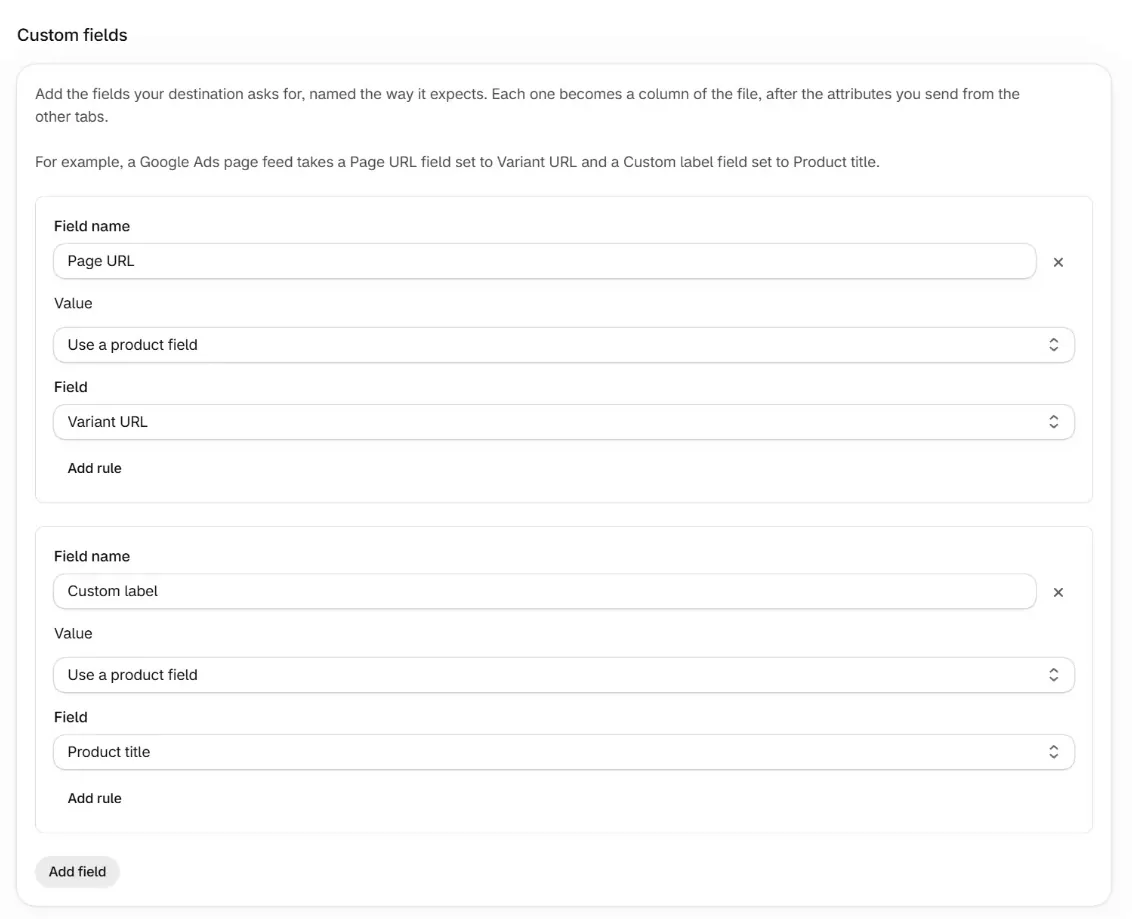
Variant URL is each variant's page on your primary domain, or on the market's URL for a market feed. To write the title and the product type as two labels instead, set Custom label to Combine fields with Product title and Product type, and a semicolon as the Separator.
The Preview section under the tabs shows the rows each variant will send before anything reaches Google Ads. Search for a product with several variants and check that every row has its own URL on your own domain.
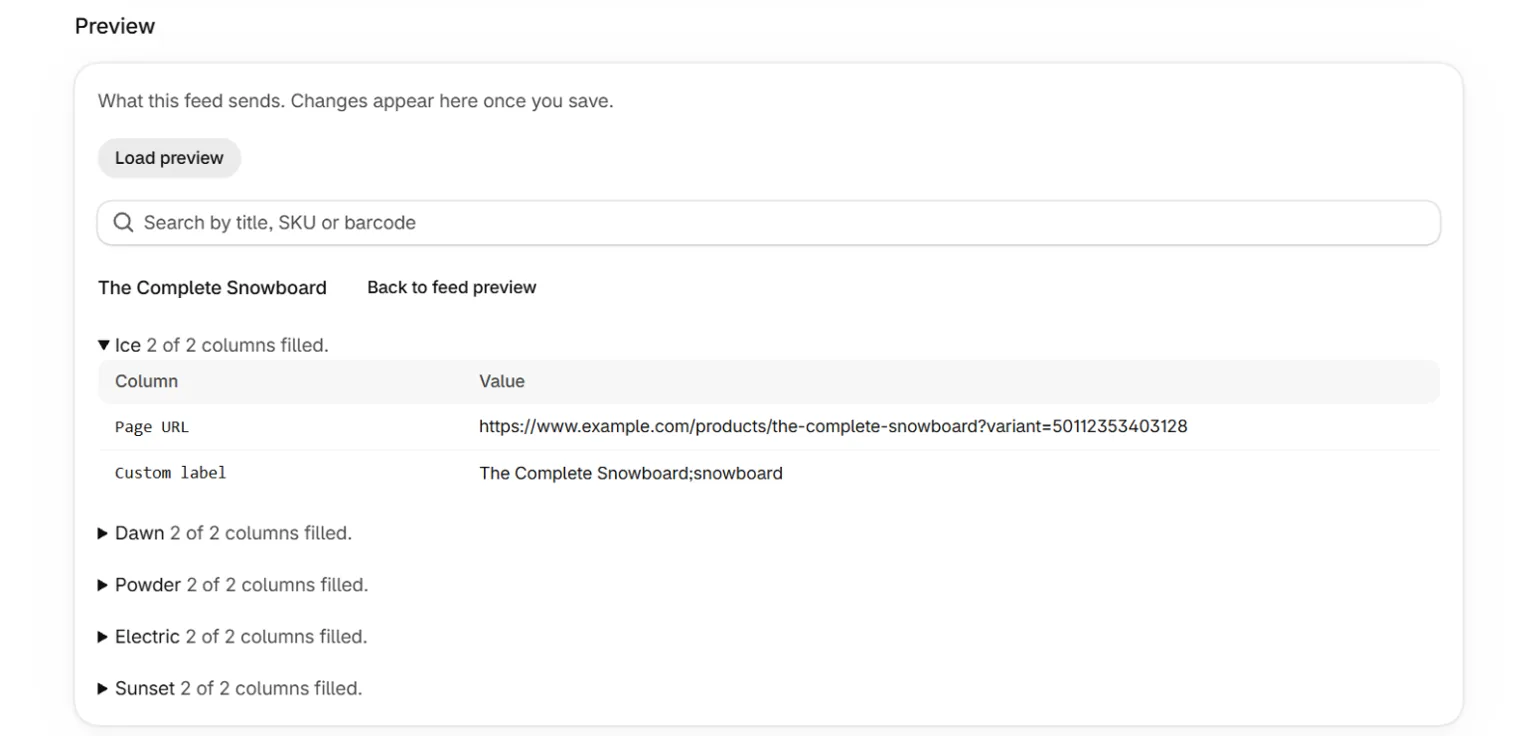
FeedShine rebuilds the file within minutes of a product change and once a day, so a new product gets its row and a deleted one drops out without another export. Products with no image or no price still get rows, because a page feed needs neither. The full steps are in build a custom feed.
How do you add a page feed to Google Ads?
You add a page feed under Business data in the Google Ads Tools menu, either as a file you upload or as a URL Google Ads fetches on a schedule, and then select it in each campaign that should use it.
Open Business data
In Google Ads, open the Tools menu and select Business data, then the plus button, then Page feed.
Name the feed and pick its source
Upload the file, or enter the feed URL and set a schedule so Google Ads fetches the current file on its own.
Apply the feed
Google crawls every URL in a new or changed page feed before those pages can serve.
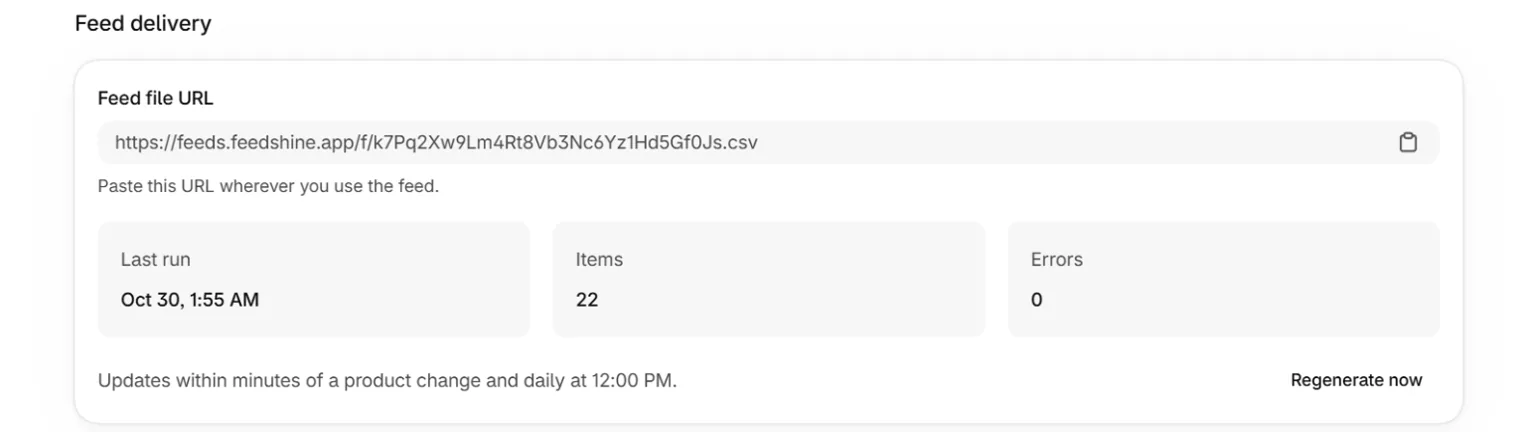
A FeedShine feed URL needs no username or password unless you set a Feed URL password on the feed, in which case the username is feed. The URL sits in the Feed delivery card on the feed's page, and a CSV feed's URL ends in .csv.
Each campaign type reads the feed through its own setting. A Dynamic Search Ads campaign offers "Use URLs from my page feed only" or "Use URLs from both Google's index of my website and my page feed" in its Dynamic Search Ads settings. A Performance Max campaign takes the feed in its Page feeds settings, which need text customization turned on, the setting that lets Google write ad text from your site's content.
Google says text customization isn't available for Shopping ads, so in Performance Max the page feed steers the text ads, while the Shopping ads keep the links from your Merchant Center product feed.
What happens to page feeds when Dynamic Search Ads become AI Max?
After a Dynamic Search Ads campaign upgrades to AI Max, Google makes the old page title and page content rules read-only, and an ad group can still target chosen pages through the custom labels in a page feed.
Google's AI Max help page lists what the upgrade changes. Dynamic ad groups become standard ad groups, Dynamic Search Ads become responsive search ads, and legacy rule types "such as 'page title contains' or 'page content contains' will become 'read-only'". Google adds that you can remove those rules but "can't add new ones or edit existing ones after the upgrade".
For Search campaigns, Google's guidance on Final URL expansion is that to target specific feed URLs, you "use custom labels for ad-group-level inclusions with Final URL expansion turned off". Final URL expansion is the setting that lets Google send a click to whichever page on your site it judges most relevant, and AI Max turns it on by default.
Take an ad group that targets pages whose title contains Snowboard. After the upgrade that rule can be removed but not edited. A Snowboards label on those rows of the page feed gives the same ad group a target you can still change.
Google upgrades Dynamic Search Ads campaigns automatically from February 2027. Before then, list the page title and page content rules your campaigns use, and give the pages each rule catches a label of their own in the page feed.
The FeedShine steps for a Custom feed are in build a custom feed, and the product feed the same catalog sends to Merchant Center is covered in Google Shopping feeds.
Google Ads page feed FAQ
How often should I refresh my Google Ads page feed?
Refresh a page feed whenever products are added, removed or relabeled. A page feed that Google Ads fetches from a URL on a schedule refreshes itself on that schedule. After a change, Google's pages give two crawl times, typically up to 24 hours in its Dynamic Search Ads troubleshooting guide and an average of 2 to 14 days in its upload instructions.
Will page feeds affect my Final URL Expansion settings?
No. Adding a page feed leaves Final URL expansion unchanged, and the setting decides what the feed does. Final URL expansion lets Google send a click to the page it judges most relevant. In Performance Max with it on, a page feed helps Google confirm your pages are indexed but doesn't limit where ads land. With it off, ads land only on page feed and asset group URLs.
When exactly does Google migrate Dynamic Search Ads to AI Max?
Google says automatic upgrades of Dynamic Search Ads campaigns to AI Max begin in February 2027. Google first set them for September 2026 and moved the date in a June 11, 2026 update to its announcement. Voluntary upgrades opened in April 2026, and automatically created assets and campaign-level broad match are on Google's schedule to upgrade from September 2026.